Each set can capture the variables that matter for that exercise: load, reps, timed work, distance, and set type, with quick edits and undo flows.
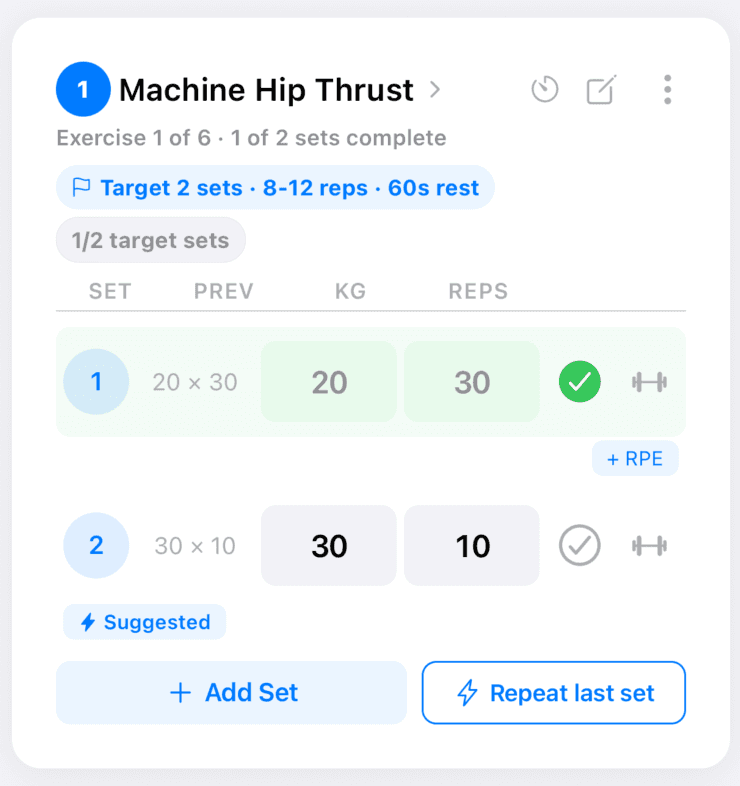
Set entry
Log weight and reps, complete sets, add RPE, and use suggestions.
Why it matters
Accurate logs power predictions, PR detection, and adaptive adjustments. Fast entry keeps you focused on lifting, not admin.
How to use it
- Tap the set row you want to complete or edit.
- Enter the fields shown for that movement (for example reps and weight, or seconds for a hold).
- Toggle completion when the set is done; undo if you tapped by mistake.
- Add a new set when you run extra volume beyond the prescription.
Tips
- If the keyboard blocks the field you need, scroll the exercise card — the layout keeps the active set in reach.
- Use set types (warm-up, working, failure, and so on) if they help you read the session later.
Related features
Discover adjacent workflows — PlateLoad gets more valuable when pieces connect.
- Predictive suggestions and Repeat Last SetNew sets can prefill from how you performed last time, with sensible adjustments when recent sets were very hard or very easy.
- Rest timersStay consistent between efforts and supersets.
- Supersets and paired workMove through paired work without losing your place.
- RPE and how progression uses itAdd effort context so future suggestions make sense.