Snap a meal; PlateLoad returns a reviewed AI estimate of macros. Treat it as a strong hint, not a laboratory measurement.
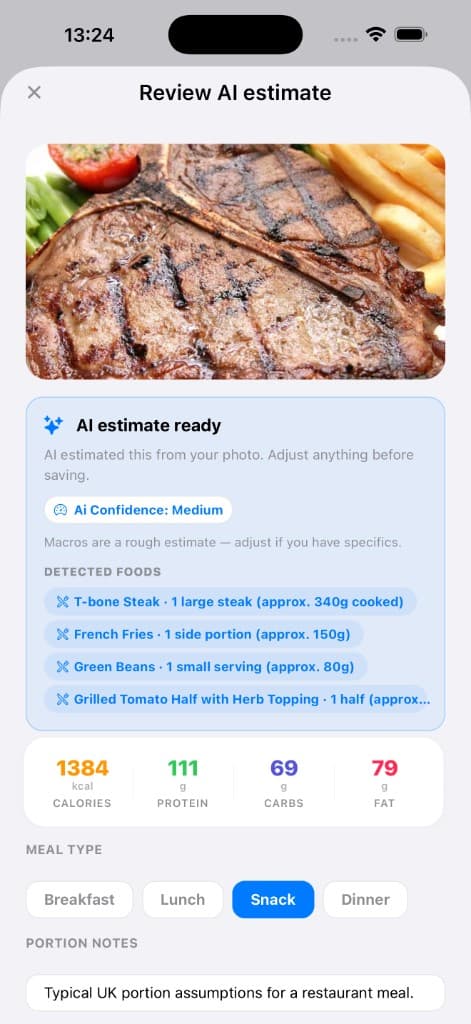
Photo meal logging
Review AI estimates, detected foods, confidence, and macros before saving.
Why it matters
Logging by photo removes friction when you did not pre-log. Honest expectations about accuracy prevent frustration.
How to use it
- Capture the whole plate with neutral lighting when possible.
- Add a short caption for hidden oils, sauces, or drinks.
- Review the estimate and adjust obvious misses before saving.
Tips
- Overhead shots with clear boundaries between foods work best.
- Premium unlocks deeper usage limits — see pricing for current caps.
Related features
Discover adjacent workflows — PlateLoad gets more valuable when pieces connect.
- Macro targets and overridesDaily targets set calories and macronutrients. You can accept calculated values from your goal profile or apply cautious manual overrides when a coach prescribes different numbers.
- Free vs PremiumFree includes core logging, basic programming, and limited AI nutrition features. Premium unlocks unlimited Program regeneration, deeper meal planning, template sharing, full coach insights, adaptive adjustments, expanded photo logging, and more.
- Meal plansGenerate structured day plans with meals, macros, and practical recipes sized to your targets.