Your Program is a structured weekly split with prescribed work. Regeneration refreshes the blueprint; adaptive adjustments fine-tune loads based on how you actually perform.
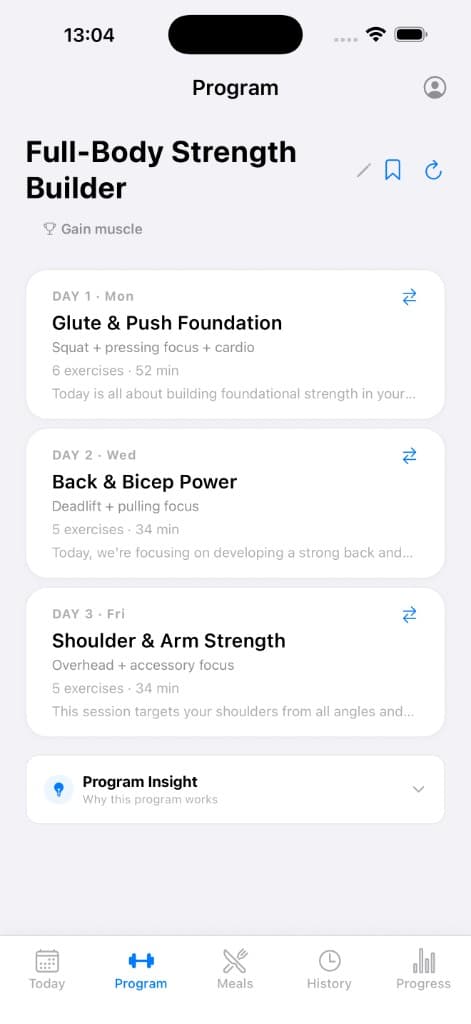
Program overview
Your Program shows scheduled training days, focus, duration, and actions.
Why it matters
Knowing what is fixed versus what adapts helps you trust the programme and use regeneration without losing progress context.
How to use it
- Review the week overview to see how days are organised.
- Open a day to see exercises, sets, rep ranges, rest, and notes.
- When life or equipment changes, update your profile inputs and regenerate if prompted.
- Premium users may see adaptive adjustments after logged sessions — review the banner to understand what changed.
Tips
- Regeneration creates a new version of the Program; your history stays intact for reference.
- If a day feels mis-scoped, prefer swapping or editing exercises before regenerating the entire Program.
Related features
Discover adjacent workflows — PlateLoad gets more valuable when pieces connect.
- How AI-generated Programs workPrograms are assembled from your onboarding inputs: goal, experience, days per week, session length, equipment access, limitations, and preferences.
- Regenerating Programs and limitsRegeneration produces a fresh Program version from your current profile. Free accounts include a capped number of generations per month; Premium unlocks unlimited regeneration.
- Adaptive adjustments (Premium)Premium adaptive logic reviews recent completion, RPE, and plateau signals to suggest load or volume nudges — not random variation.
- Editing your ProgramSwap exercises, reorder days where supported, and remove items that do not fit your facility — edits are yours to own before the next regeneration.