Learn how a PlateLoad session flows from warm-up to finish, including set entry, rest timers, previous sets, and personal records.
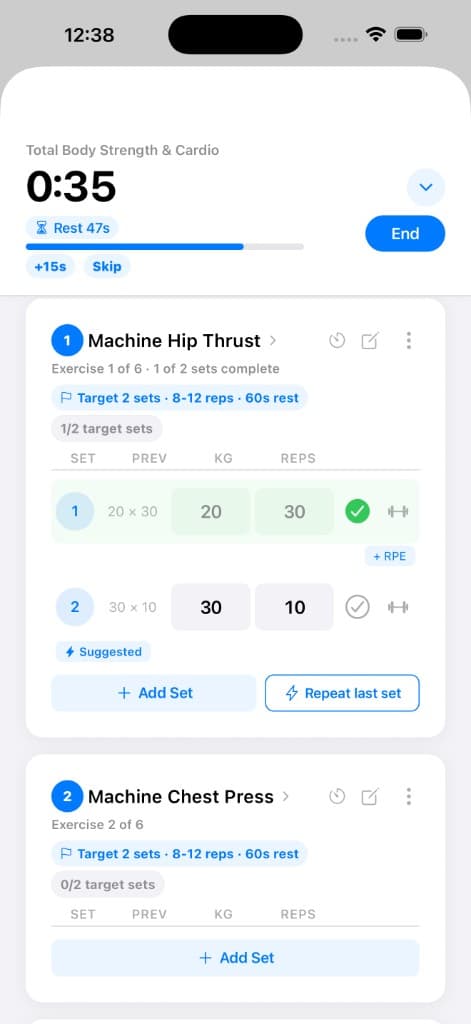
Workout logger
Exercise cards keep targets, previous performance, set entry, and actions together.
Your workout flow
The session moves in a simple loop so you always know what comes next.
- 1
Start workout
- 2
Log set
- 3
Rest timer starts
- 4
Complete next set
- 5
Track progress and PRs
- 6
Finish session
Why it matters
PlateLoad keeps your workout focused and structured by combining set logging, rest timers, previous performance, and progression tracking in one flow.
How to use it
- Start your workout: open today’s session and follow the exercises in order.
- Log each set: enter reps, weight, distance, or time depending on the exercise.
- Recover between efforts: rest timers help pace your session and keep workouts consistent.
- Track progression: previous performance and PR indicators guide week-to-week improvement.
- Finish and review: see workout volume, notes, and completed personal records.
Tips
- If something was too easy or too hard, add RPE — it helps future suggestions and adaptive progression.
- Leave short notes on exercises you want to remember next week (form cues, machine numbers, pain-free variations).
New to training?
You don’t need perfect numbers on day one. Start with manageable weights, focus on consistency, and let PlateLoad help track your progress over time.
Related features
Discover adjacent workflows — PlateLoad gets more valuable when pieces connect.
Ready to train?
Start with one session, log what you can, and let the app build useful context over time.
Continue to logging sets